
Free Amazon PPC audit for one ASIN.
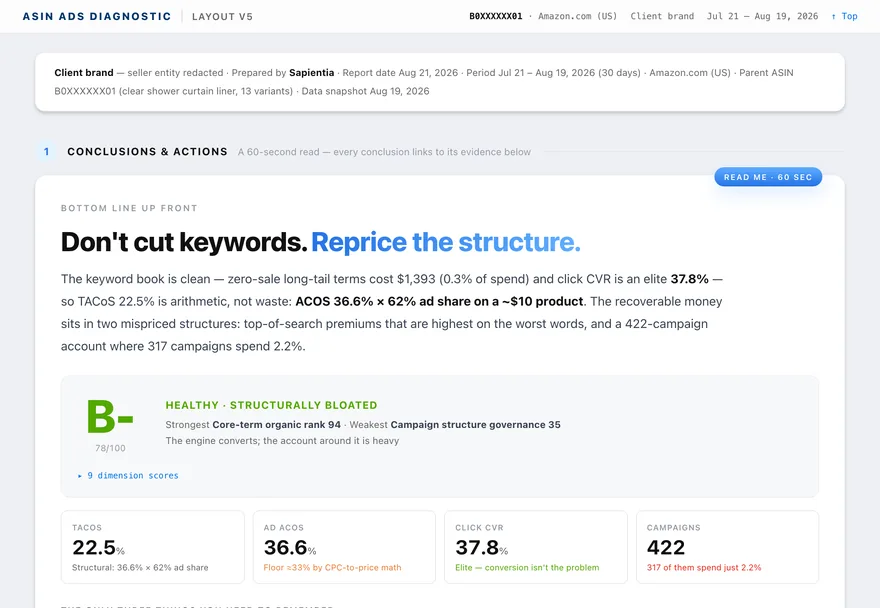
Pick one ASIN. In about 30 minutes you get a 0–100 advertising score, the nine dimensions behind it and what to fix first, with the evidence for each conclusion. No card, and nothing in your account changes.
Sign in with Amazon · official Amazon Ads API and SP-APIA report you can read in a minute and check for an hour.
The first screen tells you what to do. Everything after it shows why.
- Bottom line up front. One sentence on what to do — for example, “Don’t cut keywords. Reprice the structure.”
- Score and grade. 0–100 with a letter grade and a status, so you can compare ASINs.
- Nine dimension scores. From ad efficiency to organic rank on core terms; the weakest one is named.
- The three things to remember. Root cause, where money is leaking, and the opportunity.
- An action register. Prioritized changes, with options where there’s a trade-off and the orders each option puts at risk.
- A 30- and 90-day outlook. Projections, labeled as projections, with their assumptions in the appendix.
How it works
Connect
Sign in with Amazon and grant Ads and Seller Central access through Amazon’s official authorization. About two minutes; revoke it any time from your Amazon account.
Pick one ASIN
Choose the parent ASIN that bothers you most — the one with the biggest spend, the falling rank or the ACOS you can’t explain.
Read the report
About 30 minutes later the report is ready: score first, conclusions next, evidence after.
Decide what to do
Act on it yourself, or start the 10-day trial and approve the recommended changes from inside Sapientia.
Which ASIN to audit first
Start where money and doubt overlap. Good first candidates:
- Your largest ad spender whose ACOS sits close to, or above, its margin.
- An ASIN whose ad share keeps rising while organic sales stay flat — ads may be carrying orders that rank can’t.
- A product whose cost per order looks wrong for its basket size, even if ACOS looks fine.
Each of the sample reports started from one of these situations.
What the audit won’t do.
- Change your account. Reading a report changes nothing.
- Promise a result. Outlooks are estimates, and the report says which inputs they depend on.
- Average across your catalog. One ASIN per report, so a strong product can’t hide a weak one.
Questions
Is the audit really free?
Yes. The first ASIN audit costs nothing and needs no card. Auditing more ASINs is part of the 10-day free trial and the paid plans.
How long does an audit take?
About 30 minutes from the moment you start it. You can close the page; the report waits for you.
What access does Sapientia need?
Amazon Ads and Seller Central, each granted through Amazon’s own authorization flow. Seller Central data (sales, sessions, stock) is what lets the audit read ads against the rest of the business.
Will the audit change anything in my account?
No. An audit only reads. Changes happen only after someone on your account approves them, and that requires a trial or a plan.
Can I audit my whole account at once?
An audit covers one parent ASIN, so its conclusions are specific enough to act on. On a trial or plan you can audit as many ASINs as you like, one by one.
What if the report is wrong about my business?
Every conclusion links to the table it came from, and every projection lists its assumptions in the appendix, so you can see exactly where you disagree.
Start with one ASIN.
Pick the one that bothers you most. In about 30 minutes you’ll know what to do first.
Sign in with Amazon · no card · nothing changes until you approve it